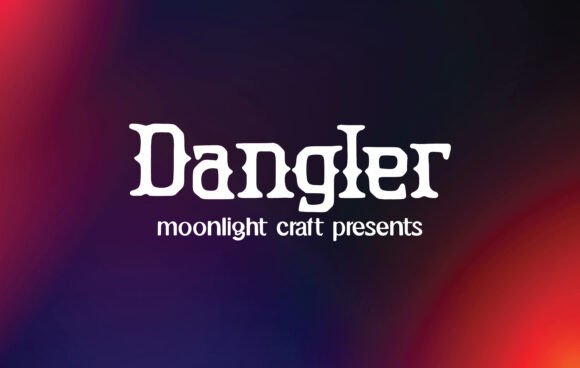
Dangler: A Bold Blackletter Font for Modern Web Design
In the fast-paced world of digital product creation, establishing a distinct visual identity is often the difference between a user bouncing immediately and one who stays to explore. As web designers and UI specialists, we constantly search for typefaces that do more than just display text; we need fonts that convey personality, set the tone, and guide the user's eye through complex layouts. Dangler emerges as a compelling solution in this space, offering a unique blend of traditional Blackletter aesthetics with a modern sensibility that fits surprisingly well into contemporary web environments. While many designers shy away from Gothic-inspired styles due to fears of poor readability or dated looks, Dangler challenges those assumptions by providing a clean, sharp, and highly stylized option for headers, branding, and hero sections.
Visual Character and Digital Personality
At its core, Dangler is a display typeface designed to command attention. Unlike standard sans serif fonts that recede into the background to prioritize pure utility, Dangler steps forward. Its strokes are deliberate, featuring the characteristic thick-and-thin contrast associated with Blackletter styles but refined for screen resolution. The result is a font that feels both historic and futuristic. For a digital product creator, this duality is invaluable. It allows you to inject a sense of authority, edge, or luxury into a landing page without relying on heavy imagery or complex animations.
The personality of Dangler is bold and unapologetic. It works exceptionally well for brands that want to project confidence, such as streetwear labels, creative agencies, music platforms, or high-end coaching services. When used in a logo design or a primary headline, it instantly communicates a specific vibe—often one of exclusivity or artistic flair. However, its beauty lies in its versatility; despite its decorative nature, the letterforms are constructed with enough clarity to remain legible at larger sizes on various devices.
Strategic Implementation in Web Layouts
Integrating a distinctive font like Dangler requires a strategic approach to visual hierarchy. In web design, not every element should scream for attention. Dangler shines brightest when used sparingly to create focal points. Here is how you can effectively deploy it across different digital touchpoints:
- Hero Sections: Use Dangler for the main H1 title on a landing page. Its strong presence grabs the user's attention within the first few seconds of loading the site.
- Call-to-Action Areas: Short, punchy phrases on buttons or above conversion forms can benefit from the font's unique weight, making the action feel more significant.
- Section Dividers: Employ Dangler for large, decorative drop caps or section headers to break up long scrolling pages and add rhythmic variety.
- Brand Assets: Ideal for creating custom graphics for social media, email headers, or digital ad banners where standing out in a crowded feed is crucial.
It is important to note that Dangler is primarily a display font. It is best suited for short phrases, titles, and logos rather than long-form body copy. Using it for paragraphs would likely hinder scanning behavior and reduce overall readability, especially on mobile screens. Instead, pair it with a highly legible sans serif font for your body text to maintain a balance between style and function.
Enhancing Brand Trust and User Engagement
The choice of typography directly influences user perception and trust. A generic font might make a brand feel safe but forgettable, while a poorly chosen decorative font can appear amateurish. Dangler strikes a middle ground by offering a premium feel that suggests professionalism and attention to detail. When users encounter a well-executed Blackletter font in a modern interface, it signals that the brand has invested in its identity. This subtle psychological cue can enhance perceived value, which is particularly useful for online stores selling boutique products or SaaS founders launching a new tool.
Furthermore, Dangler supports conversion-focused layouts by guiding the eye. In a sea of uniform geometric sans serifs, the organic yet structured shapes of Dangler create a "pattern interrupt." This stops the scroll and encourages the user to read the accompanying message. For course sales pages or portfolio sites, this can be the catalyst that moves a visitor from passive browsing to active engagement.
Font Pairing and Responsive Considerations
To maximize the effectiveness of Dangler in a responsive web environment, thoughtful font pairing is essential. Because Dangler carries so much visual weight, it pairs beautifully with neutral, clean typefaces. A simple geometric sans serif works well for a modern, tech-forward look, while a classic serif font can create a sophisticated, editorial aesthetic suitable for luxury goods or cultural institutions.
When designing for mobile, extra care must be taken with sizing and spacing. Blackletter fonts can sometimes feel dense on small screens. Ensure there is ample line height and letter spacing (tracking) when using Dangler in navigation menus or subheaders on smartphones. It performs best against high-contrast backgrounds; white text on a dark background or vice versa ensures the intricate details of the letterforms remain crisp. Avoid placing Dangler over busy image overlays unless a solid color block or heavy drop shadow is used to separate the text from the background.
Licensing and Technical Specifications
Before integrating Dangler into a client project or a commercial product, it is vital to review the licensing terms. As a premium font, it typically comes with specific guidelines regarding webfont usage, app embedding, and commercial distribution. Ensure you have the correct license for your intended use case, whether it is for a single website, a digital template for sale, or a comprehensive brand identity system. Check for available file formats such as WOFF2 for optimal web performance, and verify if the package includes alternate glyphs or multilingual support if your project targets a global audience.
Ultimately, Dangler represents a powerful tool in the digital designer's arsenal. It proves that historical styles like Blackletter can be reimagined for the modern web, offering a fresh way to build brand identity and captivate users. By using it strategically within a clear visual hierarchy and pairing it with functional body typography, you can create digital experiences that are not only beautiful but also effective and memorable.